Ahrefs is one of the most well-known SEO tools on the market, and it has definitely earned that reputation. The backlink index is one of the largest in the industry, the keyword research functionality is solid, and it covers enough ground to serve as an all-in-one platform for many teams -but that doesn’t mean it’s the right fit for everyone.
According to G2 user reviews, the top criticisms of Ahrefs are consistently cost and feature limitations outside of core SEO. The ‘Lite’ plan starts at $129 per month for one user, and while that gets you access to the core toolkit, caps on tracked keywords, historical data and user seats mean agencies managing multiple clients and growing in-house teams often need to upgrade quickly. That cost adds up fast.
The other driver is feature fit, because while Ahrefs is a strong generalist SEO platform, if your priority is content optimization, AI search visibility, deep technical crawling, or measuring and proving the impact of your SEO work, there are other tools that outperform it in those specific areas.
This guide covers 10 of the best Ahrefs alternatives and competitors, from direct like-for-like replacements to specialist tools that go deeper into specific workflows. Whether you’re looking to switch entirely or build a more focused SEO stack, there’s something here for you.
Table of contents
- Why consider alternatives to Ahrefs?
- TL;DR – A quick summary of the best Ahrefs alternatives
- What to do next?
- Get started with SEOTesting
- Frequently asked questions
Why consider alternatives to Ahrefs?
Price
Ahrefs is not the most expensive tool on the market, but it isn’t cheap either. At $129/month for the Lite subscription (one user, 5 projects, 750 tracked keywords), the cost escalates quickly once you need more capacity. Agencies managing 10+ client sites or teams requiring multiple user seats will often need to upgrade to the Advanced tier or higher.
If you’re already running other tools in your stack, such as a dedicated rank tracker, content optimization platform or technical crawler, the case for paying the Ahrefs subscription fee gets weaker. A more focused, lower-cost tool that covers exactly what you need may give you significantly better value.
Feature Fit
Ahrefs is built primarily around backlink analysis and keyword research. Both features are genuinely excellent, but if your work requires content optimization, monitoring how AI models represent your brand, running detailed log file analysis or measuring whether your SEO changes are actually moving the needle, Ahrefs isn’t the right tool for those jobs.
TL;DR – A quick summary of the best Ahrefs alternatives
Don’t have time to read the full breakdown? No problem! Here’s the short version.
Tool | Best For... |
SEOTesting | Measuring SEO changes and proving SEO impact |
Semrush | Most like-for-like Ahrefs competitor |
Moz Pro | Ease of use and SEO fundamentals |
SE Ranking | All-in-one SEO software at a lower price point |
Keyword Insights | Keyword research and topic clustering at scale |
Waikay | AI search visibility and GEO optimization |
Majestic | Deep backlink analysis and link intelligence |
Screaming Frog | Best-in-class technical SEO crawler |
Sitebulb | Technical audits with cloud crawling options |
Surfer SEO | On-page content optimization |
1. SEOTesting – Best for measuring SEO changes and proving SEO impact
Of course, we are going to be biased, but we believe SEOTesting is the best Ahrefs alternative when your priority is measuring SEO changes, proving the impact of your work and building structured reporting workflows using Google Search Console data.
Where Ahrefs focuses primarily on discovery, such as finding keyword opportunities, auditing backlinks and flagging technical issues, SEOTesting is built around the question that matters most once the work is done: did that change actually make a difference to traffic and revenue?
It’s purpose-built for in-house SEO teams and agencies that need to move beyond raw GSC data and want a structured way to test hypotheses, log changes and report results in a stakeholder-friendly way. If you’re looking for a Google Search Console alternative that takes the data you’re already collecting much further, SEOTesting is worth a closer look.
Features
Here are some of SEOTesting’s key features, to help you decide if it might be the right tool for you:
Dashboards built on GSC data
All of SEOTesting’s data is built on Google Search Console data. This is, by far, the most accurate data you can use for an SEO tool as it’s first-party and provided by Google directly. Not only that, but because SEOTesting uses the Google Search Console API, we can also get around Google’s 1,000-row data limit, so you can access all of your raw GSC data.
We’ve used this information to build handy dashboards, such as the Launchpad, that will allow you to view a range of different sites at a glance, and get a quick feel for how your key sites are performing:

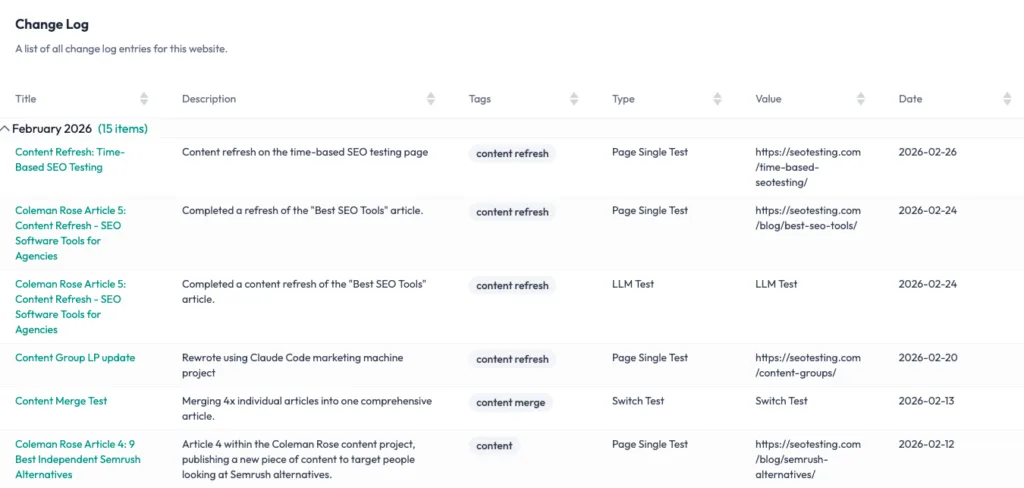
Site changelog and annotations
The site changelog and annotations features inside SEOTesting allow you to keep track of:
- Everything that has been done on your website.
- Events that have the ability to impact your organic search performance.
These features can serve as great resources for your team to both track everything (using the site changelog) and get ahead of events like public holidays, changes in search intent or anything else that might impact traffic (using annotations).
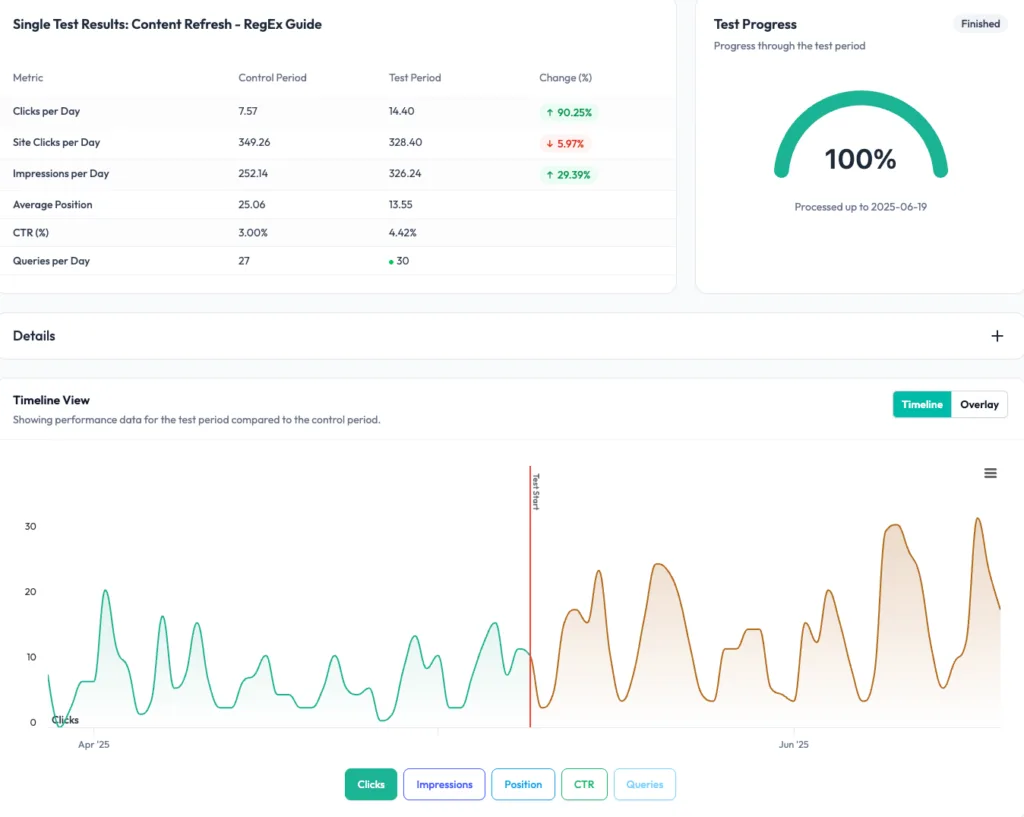
Time-based SEO testing and SEO split testing
SEOTesting’s testing features are its bread and butter, obviously. Using the time-based test feature, you can quickly get a handle on how work such as content updates, metadata changes, internal link changes or any other on-page SEO or off-page SEO work impacts your pages:
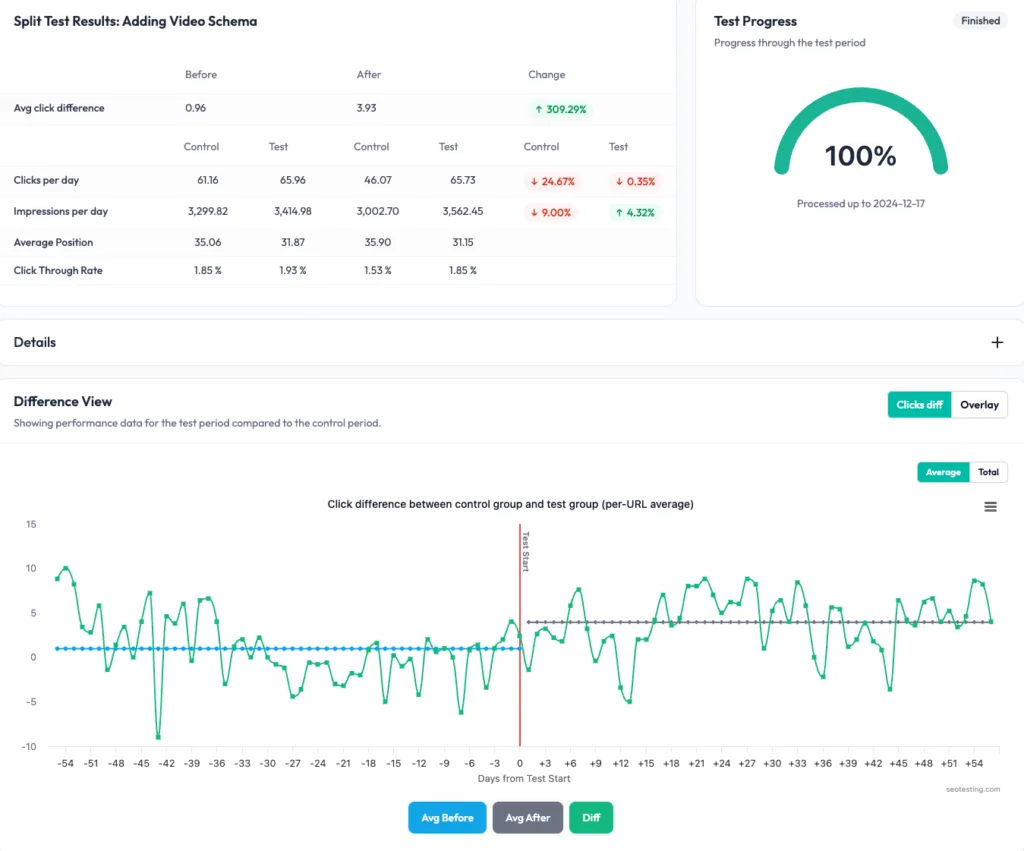
You can also use the split test feature to see how larger changes, such as page template changes or technical SEO fixes, impact your site’s traffic:
Opportunity reports
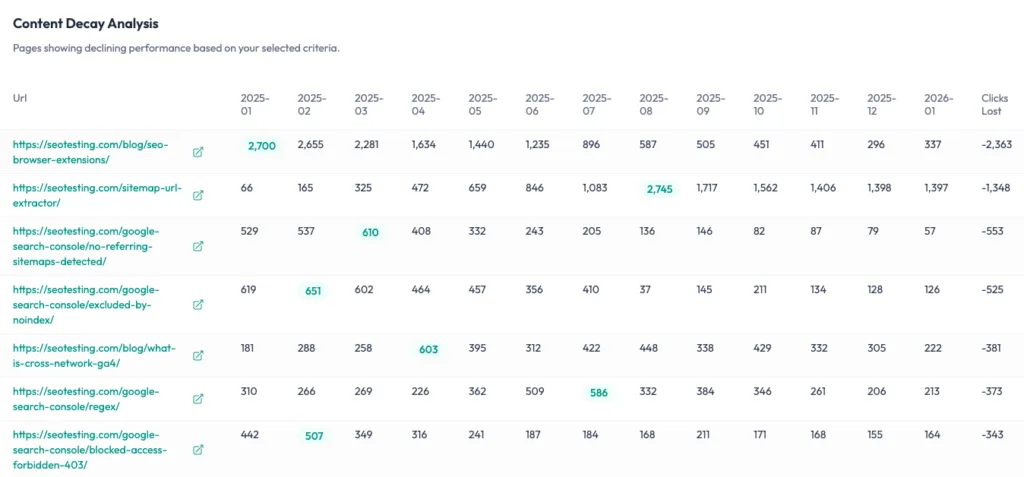
We’ve also built a range of reports in SEOTesting using Google Search Console data to help you find quick wins, identify issues on your website and pinpoint areas for improvement.
One such report is the Content Decay Report that gives you insight into content that has lost clicks, so you can prioritize which pages to go ahead and update to try and get back some of that lost traffic:
Algorithm update overlays
We know that ongoing Google algorithm updates can be the bane of every SEO professional’s existence. We’ve built Google algorithm overlays into SEOTesting so you can see exactly when Google releases official updates:

But we’ve gone a step further…
We’ve tied these annotations into our Compare Periods report, so clicking into an update will show you exactly what pages have been impacted (positively or negatively) by the Google update:
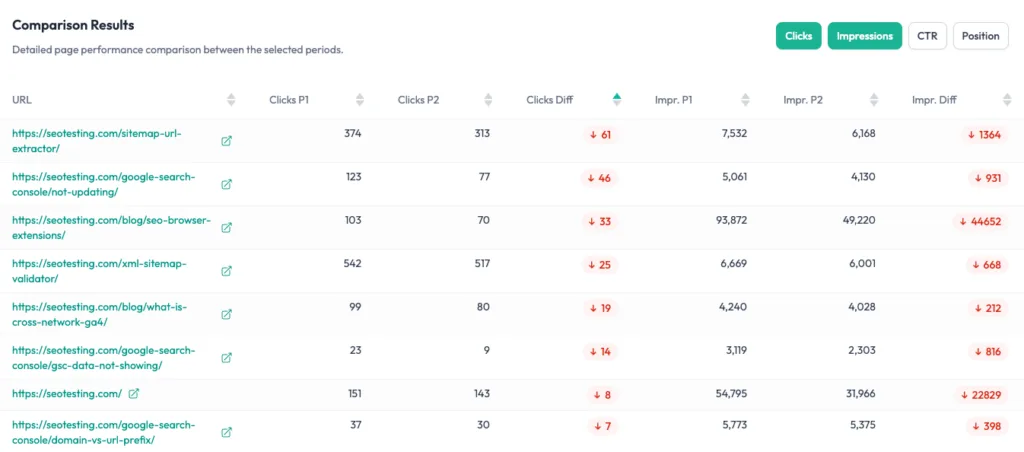
SEOTesting also includes a dedicated rank tracker that’s built on Google Search Console data, and a sitemap monitor that monitors your sitemap on a daily, weekly or monthly basis, flagging:
- New pages
- Changed pages
- Removed pages
Ease of use & setup
SEOTesting connects to Google Search Console in as few as eight clicks and requires nothing to install. Once connected, you can get started straight away by running your first SEO test, and most SEOTesting users are up and running within a few minutes. The only dependency is Google Search Console – there’s no additional data or tracking setup needed.
Pricing
SEOTesting’s pricing is listed below:
- Free Trial: 14 Days
- Single Site: $50/month
- Medium Plan: $125/month
- Large Plan: $375/month
- Enterprise: Pricing On Request
Reviews
G2 | Capterra | Software Advice |
4.8/5 | 4.9/5 | 4.9/5 |
The vast majority of reviews for SEOtesting are positive, scoring at 4.8 or 4.9 out of 5 across G2, Capterra and Software Advice.
The ability to track a wide range of SEO changes (e.g., content updates, internal linking and digital PR impact) via single, group, or split tests is cited frequently, with users describing it as easy to implement, while reviewers also value the daily sitemap updates for spotting URL changes or removed products.
Who is SEOTesting best for?
SEO teams that need repeatable reporting, structured testing workflows, and a clearer view of what’s actually driving performance changes. It’s particularly valuable for agencies and in-house SEO teams investing in SEO and needing to demonstrate clear, evidence-based impact.
Click here to start your free trial of SEOTesting
2. Semrush – The most like-for-like Ahrefs competitor
Semrush is an all-in-one digital marketing platform covering:
- SEO
- PPC
- Social media
- Content marketing
This makes it the most direct Ahrefs competitor in terms of feature breadth.
If you’re on Ahrefs and want a tool that covers the same SEO ground but adds broader digital marketing capabilities, Semrush is the most natural comparison. For a full look at what competes with Semrush itself, see our guide on Semrush alternatives.
Features
Semrush’s core SEO modules include the Keyword Magic Tool (one of the largest keyword databases on the market), Backlink Analytics, Position Tracking for rank monitoring, a Site Audit crawler, and on-page SEO optimization suggestions.
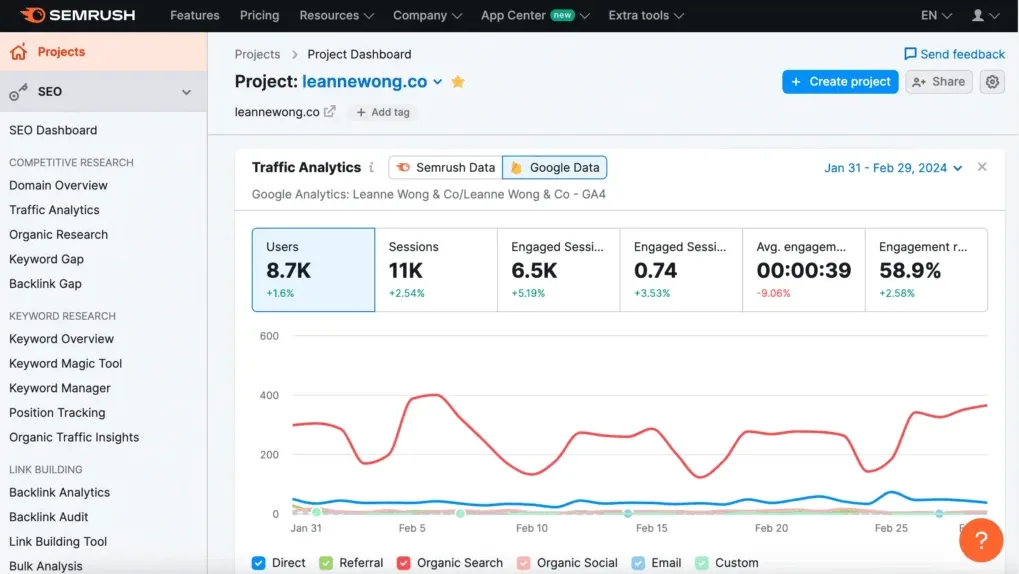
Beyond SEO, Semrush also covers AI search tracking and optimization, social media management, PPC and advertising research, and market research and competitive intelligence.
For agencies and in-house teams looking for a single platform across multiple marketing channels, very few tools come close.
Ease of use & setup
Semrush is quick to set up, and you can get value within minutes of creating your first project. Given its breadth, there is a steeper learning curve than more focused SEO tools.
Navigation between keyword research, backlink analysis and site auditing within a project is reasonably smooth, and Semrush shortens onboarding time through a certification academy, webinars and in-platform hints and guidance.
Pricing
SEO Classic:
- Free: 1 Website, 10 Analytics Reports/Day, 10 Tracked Keywords
- Pro: $139.95/Month – 5 Websites, 500 Tracked Keywords, Core SEO Tools
- Guru: $249.95/Month – 15 Tracked Websites, 1,500 Keywords, Content Marketing Toolkit, Looker Studio Integration
- Business: $499.95/Month – 40 Websites, 5,000 Keywords, API Access, Share of Voice
Semrush One:
- Pro: $199/Month – 5 Projects, 500 Tracked Keywords
- Guru: $299/Month – 15 Projects, 1,500 Keywords, Content Marketing Toolkit
- Business: $549/Month – 50 Projects, 5,000 Keywords, API Access
Enterprise:
No public pricing. Treated almost as a separate product.
Reviews
G2 | Capterra | Software Advice |
4.5/5 | 4.6/5 | 4.6/5 |
Reviews generally describe Semrush as a broad all-in-one platform that covers multiple SEO activity streams (keyword research, competitor analysis, site audits, rank tracking and reporting), with keyword and competitive research most consistently called out as the standout value in reviews.
Pricing is one of the most common downsides, with frequent mentions of the tool being expensive or needing higher tiers for more usage. What’s more, while many people treat the data as very useful for direction and prioritization, some note that certain metrics can be imperfect or fluctuate, so they sanity check important decisions elsewhere.
If you look beyond product review sites, Trustpilot customer reviews skew more negative and often focus on billing and cancellation experience rather than SEO capabilities.
Who is Semrush best for?
Semrush is best for SEO professionals, agencies and marketing teams that need a comprehensive, multi-channel toolkit under one roof. The Guru and Business plans are particularly well-suited to agencies managing multiple clients and enterprises handling multiple websites.
3. Moz Pro – Another like-for-like Ahrefs alternative
Moz Pro is one of the original SEO platforms, known for its accessible, education-first approach and for Domain Authority and Page Authority, two metrics that over time have become industry-wide standards.
Features
Moz Pro covers the SEO fundamentals through four core tools:
- Keyword Explorer for keyword research and difficulty scoring
- Link Explorer for backlink analysis
- Site Crawl for technical auditing
- Rank Tracking with campaign-based dashboards
The Link Explorer database covers 45.5 trillion links and gives you Domain Authority, Page Authority and Spam Score alongside standard backlink data. Domain Authority and Page Authority have become so widely adopted across the industry that teams using other primary tools often reference Moz’s metrics for link evaluation, which gives Moz a certain baseline relevance regardless of which platform you primarily use.
A standout feature is Moz’s one-page optimization tooling, and Page Optimization scoring and content suggestions surfaced within campaign dashboards are genuinely useful for in-house teams building content. Moz’s API for link data is also notably affordable at $5/month, well below comparable API access from Ahrefs or Semrush.
One thing to be aware of is that rank tracking updates weekly by default, which is slower than the daily tracking available from most competitors.
Ease of use & setup
Ease of use is one of Moz Pro’s genuine differentiators. Users consistently praise the intuitive interface and gentle learning curve.
Meanwhile, Moz’s educational content, such as the Moz Blog, Q&A forums and Moz Academy, helps teams build their SEO knowledge as they use the tool, making it particularly valuable for less-experienced members of in-house teams who are building their skills as they go.
Pricing
- Starter: $49/Month – 1 User, 1 Tracked Site, 50 Keywords Per Month, 20,000 Pages Crawled Per Month
- Standard: $99/Month – 1 User, 3 Tracked Sites, 300 Keywords, 400,000 Pages Crawled
- Medium: $179/Month – 2 Users, 10 Tracked Sites, 1,500 Keyword Rankings, 2 Million Pages Crawled, Branded Reports
- Large: $299/Month – 3 Users, 25 Tracked Sites, 3,000 Keywords, 5 Million Pages Crawled
There is also a 20% discount available on annual plans.
Reviews
G2 | Capterra | Software Advice |
4.3/5 | 4.5/5 | 4.5/5 |
A user-friendly interface and easy-to-use features are frequently praised by Moz users, making it accessible to SEO professionals of all skill levels.
However, Moz Pro might leave more experienced SEOs wanting, as others have commented on its limited features set, specifically in comparison to Ahrefs.
Who is Moz Pro best for?
Small to mid-sized businesses, in-house marketing teams and SEO professionals at beginner to intermediate level who want an easy-to-use, all-in-one platform with a gentle learning curve.
4. SE Ranking – An all-in-one that won’t break the bank
SE Ranking is an affordable all-in-one SEO platform that delivers the core features agencies and in-house teams use every day, at a price point well below Ahrefs and Semrush.
If price is the primary reason you’re exploring Ahrefs alternatives, SE Ranking is one of the most compelling options on this list. It covers rank tracking (its original flagship feature), keyword research, backlink analysis and monitoring, competitor research, and technical site auditing, all in a single platform at a fraction of the cost of Ahrefs.
Features
SE Ranking’s key modules include website rank tracking with flexible update frequency, a comprehensive website audit tool, backlink checker and monitoring, competitor research, and keyword research. For most day-to-day SEO workflows, the kind that agencies and in-house teams run repeatedly, this covers the majority of what a multi-purpose platform needs to handle.
Ease of use & setup
SE Ranking is consistently praised for its clean, modern interface. The platform is consistently praised by users for its intuitive, easy-to-navigate interface, particularly compared with the more complex dashboards of Semrush and other tools.
Setup is fast:
- Create an account
- Add your website
- And you’re running rank tracking and site audits within minutes
Pricing
- Essential: $65/Month – Core Toolkit, Lower Usage Limits
- Pro: $119/Month – Higher Limits, Expanded Capabilities, Additional Seats & Projects
- Business: $259/Month – Maximum Limits, Expanded Data Reach
You can save approximately 20% by choosing the annual billing option.
Reviews
G2 | Capterra | Software Advice |
4.8/5 | 4.7/5 | 4.7/5 |
SE Ranking is a well-regarded SEO tool by its users, with reviewers recognising its robust rank tracking, competitor analysis and side auditing tools.
The most frequent downsides tend to be around feature limitations.
Who is SE Ranking best for?
Freelancers, small to mid-sized agencies and SMB in-house teams that need a full-featured SEO toolkit without the price tag of market leaders.
5. Keyword Insights – For keyword research and topic clustering
Keyword Insights is a specialist keyword research and keyword clustering tool that goes significantly deeper into these activities than Ahrefs does out of the box.
Where Ahrefs treats keyword research as one specific feature within its broader platform, Keyword Insights is built around it. If your SEO strategy involves building out topic clusters, creating content briefs at scale and understanding search intent across a large keyword set, Keyword Insights offers stuff that Ahrefs simply doesn’t have.
Features
Core capabilities include:
- Keyword research and discovery
- Clustering keywords into semantically related groups based on SERP similarity
- Search intent classification
- AI-driven content brief generation
- Hub-and-spoke content architecture workflows
Keyword Insights processes keyword lists at scale and gives you structured clusters that are immediately usable for reporting or handoff to content teams.
Ease of use & setup
- Create an account
- Start the $1 trial or choose a plan
- Import your keyword list as a CSV or by pasting directly
From there, Keyword Insights handles the clustering and content brief generation, which you can then pass over directly to whoever handles content creation within your team.
Pricing
Keyword Insights is available in three pricing tiers, all of which are available on monthly payment terms, but that come with a 20% discount when billed annually. The three packages on offer are:
- Basic: $58/Month
- Professional: $99/Month
- Premium: $299/Month
Keyword Insights offers a trial, although unlike some of the other tools in this list, it’s not free – you’ll have to pay $1 for 7-day access to all the features.
Reviews
G2 | Capterra | Software Advice |
4.9/5 | 4.7/5 | 4.7/5 |
Most reviews have a positive experience with Keyword Insights, citing strong keyword clustering (including grouping keywords based on SERP similarity and surfacing intent), very fast processing, and clean Google Sheets-style outputs, plus the option for annual plans so credits are available across the full year rather than expiring month-to-month.
Some reviews do however have concerns about missing workflow/data fields (e.g., no recommended word count column), export/structuring limitations for hub–spoke mapping, handling of no_cluster keywords, and a bit of a learning curve, although that’s reasonable given the tool targets experienced SEOs.
Who is Keyword Insights best for?
Content and SEO teams doing keyword clustering, search intent grouping and content brief creation at scale. If you’re building out a structured content programme and want topic architecture that goes beyond what Ahrefs provides, Keyword Insights has been built specifically for that workflow.
6. Waikay – A budget-friendly AI search optimization tool
Waikay is a lower-cost, specialist AI visibility monitoring tool for teams that want to understand and improve how AI models represent their brand. This is a capability that Ahrefs doesn’t currently offer.
As LLMs like ChatGPT, Perplexity and Gemini become more prominent in how people find information, understanding how your brand appears in AI-generated results is a growing pain point for agencies and in-house teams alike. Waikay is one of the first tools built exactly for this challenge.
If you’re looking for an LLM visibility tool to add to your stack, Waikay is one of the most accessible options out there at the moment.
Features
Waikay’s features are geared towards helping you to monitor and strengthen your AI presence, including:
- Brand AI Visibility Tracking—showing you how AI models perceive all of the competing brands across multiple prompts.
- Topic Reports—identifying your strengths and weaknesses and offering recommendations for how to improve your strategy.
- Fact Tracker—allows you to validate AI-generated facts about your brand.
- Source Tracking—aggregates AI model citations and differentiates between commercial prompts and topic understanding.
- GEO Action Plans—tailored action plans based on topic-level insights.
Ease of use & setup
Waikay is quick and easy to get started with, and it’s designed to simplify core SEO workflows.
After creating an account, you can connect your website and begin exploring keyword insights, performance data and optimization suggestions, and the platform will guide you throughout the setup process, making it accessible for beginners while still offering useful data for experienced marketers.
Once you’re up and running, Waikay is used to monitor keyword opportunities, track performance and support content optimization, helping teams prioritize actions without needing deep technical expertise.
Pricing
Waikay is available in three product tiers:
- Small Teams, designed for in-house brand managers, priced at $69.95 per month
- Large Teams, designed for smaller agencies and multi-brand monitoring, priced at $199.95 per month
- Bigger Projects, designed for mid-sized agencies, sites with multiple languages and bigger projects, priced at $444 per month
Not sure which plan is right for you? Waikay’s pricing is based on credits, and they provide a ‘credit calculator’ to make it easy for you to identify what you need.
Each credit equates to one report, while the number of credits you need is based on:
Prompts x frequency x models x projects
Reviews
G2 | Capterra | Software Advice |
4.9/5 | none found | none found |
Note: No reviews currently available on Capterra or Software Advice.
Most reviews have a positive experience with Waikay, citing a clear, structured way to see how AI models describe their brand and competitors (so teams can spot missing/incorrect information and get actionable fixes), plus practical AI/GEO-focused insights like topic analysis, action plans, and entity insights that help diagnose where a brand is strong vs. misunderstood across platforms like ChatGPT, Gemini, and Perplexity.
Who is Waikay best for?
Brands and teams focused on monitoring and improving their presence in AI search results. Particularly those that want more specialized AI search insights than a general-purpose SEO platform (like Ahrefs) can offer.
7. Majestic – For backlink metrics and link intelligence
Majestic (formerly Majestic SEO) is a specialist SEO platform focused on backlink analysis and link intelligence. Rather than trying to be an all-in-one toolkit, it excels in mapping the web’s link graph, giving users deep insight into how websites are connected and how authority flows between them. Its proprietary metrics, such as Trust Flow and Citation Flow, help marketers assess link quality and identify authoritative domains with precision.
Compared with broader platforms like Ahrefs, Majestic is less focused on keyword research or content optimization and more dedicated to link data depth. While Ahrefs offers a more rounded SEO suite, Majestic often stands out for its historic index and granular backlink analysis, making it particularly valuable for digital PR, link auditing and competitive link research.
For teams prioritizing link-building strategy, Majestic remains a powerful and purpose-built solution.
Features
Majestic offers an advanced feature set, revolving around backlink data and site authority analysis and is arguably Ahrefs biggest competitor here.
Its core offering is the Site Explorer: input a domain (or URL or subpath) and you get extensive backlink information: total backlinks, referring domains, Trust Flow, Citation Flow, topical categories of links, anchor text distribution, etc.
Majestic provides two indices of backlink data:
- Fresh Index (links discovered in the last 90 days)
- Historic Index (all links going back many years)
This historical depth is a standout feature, and you can analyse long-term link acquisition and even resurrect data on links that have disappeared.
Majestic’s metrics are central to how SEOs interpret link quality and authority. Trust Flow evaluates the quality of backlinks by measuring how closely a site is linked to a curated set of trusted seed sites, whereas Citation Flow reflects the overall volume and influence of links. Used together, these metrics provide a quick but effective way to assess a site’s backlink profile. For example, a high Citation Flow paired with a low Trust Flow may indicate a large number of lower-quality links.
Another valuable feature is Topical Trust Flow, which categorises backlinks into subject areas such as Sports, or Home and Garden. This helps users understand not just the strength of a site’s link profile, but also its relevance and authority within specific thematic areas. Beyond this, Majestic offers tools such as Backlink History, which visualizes how a domain’s backlink profile has grown over time, and a Bulk Backlink Checker for comparing multiple domains simultaneously.
For link prospecting, Majestic includes features like Clique Hunter, which identifies websites linking to competitors but not to your own site, helping uncover outreach opportunities (like Ahrefs’ Link Intersect tool).
Its Link Context feature adds further depth by showing where a link appears on a page, such as within the main content or sidebar, and how many other outbound links are present. Together, these capabilities make Majestic a highly specialised and data-rich platform for backlink analysis and strategic link building.
Ease of use & setup
To get started with Majestic, create an account and enter your domain into Site Explorer. From there, you can immediately access backlink data, including referring domains, anchor text and proprietary metrics like Trust Flow.
Setup is minimal, as the platform relies on its own link index rather than integrations, but Majestic’s UI and UX are sometimes considered old-school and geared toward advanced users. Its design is more data-dense and utilitarian, with lots of tables, numbers, and arguably dated visuals compared to the dashboards of newer tools.
Day-to-day use focuses on analysing link profiles, comparing competitors and identifying opportunities for link building, making it a straightforward but powerful tool for backlink research.
Pricing
Majestic offers three product packages depending on the features you need:
- Lite, intended for auditing and prospecting a small group of sites, available for $49.99 per month.
- Pro, intended for agencies, domain traders and SEO consultants, available for $99.99 per month
- API, for large agencies, power users and developers, available for $399.99 per month.
Note that you can choose to pay monthly or annually, the latter of which secures you a discount on the normal monthly price.
Reviews
G2 | Capterra | Software Advice |
4.3/5 | 4.5/5 | 4.5/5 |
Reviews most often praise the depth of its link index and link analysis tools, and frequently call out Trust Flow and Citation Flow as useful for judging link quality and prioritizing outreach, as reflected in G2 reviews, Capterra verified reviews, and TrustRadius reviews, as well as in editorial coverage like theTechRadar review.
Common negatives are that the experience can feel dated or less intuitive, bulk analysis and workflow features can be limiting compared with broader platforms.
Who is Majestic best for?
Majestic is best suited to SEO professionals, digital PR teams and link-building specialists who need deep backlink insights.
It’s particularly valuable for those focused on authority analysis, competitor link research and auditing link profiles, rather than broader SEO tasks like keyword tracking or technical site optimization.
8. Screaming Frog SEO Spider – The best technical SEO desktop crawler
Screaming Frog SEO Spider is a desktop-based crawler built for in-depth technical SEO audits.
Unlike some of the other platforms in this article, Screaming Frog focuses almost entirely on on-site analysis rather than backlink data or keyword tracking. Its strength lies in the level of control and detail it offers, allowing users to customize crawls, extract specific data and analyse large sites with precision—and it remains one of the go-to solutions for technical auditing and optimization.
Features
Screaming Frog SEO Spider is built around comprehensive technical auditing, offering a wide range of core checks that help identify issues impacting a website’s search performance. At a foundational level, it scans for broken links, server errors and redirect chains, while also analysing on-page elements such as title tags, meta descriptions and meta robots directives. It supports hreflang validation for international sites, detects duplicate content and audits XML sitemaps to ensure alignment with crawlable URLs. What’s more, visualizations, including crawl diagrams and site structure maps, help users better understand how pages are interconnected.
Beyond this, Screaming Frog provides advanced crawling and data extraction capabilities that give users significant control over how audits are conducted. It can render JavaScript to accurately crawl modern, dynamic websites, and allows for crawl comparisons to track changes over time. Features such as near-duplicate detection, custom extraction and the ability to run custom JavaScript enable highly tailored analysis. Users can also configure custom robots.txt rules to test how search engines might interpret crawl directives under different scenarios.
Ease of use & setup
Screaming Frog requires a desktop download and installation, but once installed it is easy to use and lightweight to run: simply enter a website URL and start a crawl. You can customize settings to control crawl depth, user agents and data extraction, and after crawling, the tool presents detailed reports on technical SEO issues such as broken links, redirects and metadata gaps.
Using Screaming Frog involves exporting data, diagnosing issues and working through fixes, making it a hands-on tool for technical audits.
Pricing
Screaming Frog SEO Spider can be downloaded and used completely free, but you’ll be limited to 500 URL crawls per month, meaning the freemium version isn’t suitable for most agencies or enterprise teams.
A paid license, granting you access to unlimited URL crawls and advanced features, is available for $279 per year, per user, with discounts applying for the more licenses you buy within a certain range:
- 1 to 4 licences: $279 per licence, per year
- 5 to 9 licences: $265 per licence, per year
- 10 to 19 Licences: $249 per licence, per year
- 20+ Licences: $235 per licence, per year
Reviews
G2 | Capterra | Software Advice |
4.3/5 | 4.5/5 | 4.5/5 |
Screaming Frog reviews on G2, Capterra, and TrustRadius generally describe it as a go to technical SEO crawler that is fast, thorough and especially strong for auditing at scale (titles, metadata, status codes, internal linking, redirects, sitemaps, structured data checks).
Reviewers also tend to like the value, including a free tier and an affordable paid license, and they often mention workflow helpers like scheduled crawls and exporting data for reporting or fixing.
The recurring downsides are that it can feel technical and overwhelming at first, and the UI is described as dated compared with newer tools, which also comes up in editorial coverage like the TechRadar review.
Who is Screaming Frog best for?
Screaming Frog is ideal for technical SEO specialists, developers and in-house teams managing complex websites.
It suits users who want granular control over site crawls and detailed data extraction, making it a go-to for diagnosing technical issues at scale and conducting thorough site audits.
9. Sitebulb – A best-in-class technical crawler with cloud options
Similar to Screaming Frog SEO Spider, Sitebulb is a website crawler designed to make technical SEO audits more accessible, actionable and visually intuitive.
It analyses sites for issues such as broken links, indexability problems and on-page optimization gaps, but sets itself apart thanks to its guided audit workflows and prioritized recommendations. The Hints system also identifies problems and provides clear explanations and suggested fixes, helping users to solve technical issues more quickly.
Unlike Screaming Frog, Sitebulb places greater emphasis on usability and visualization, with interactive charts, crawl maps and intuitive dashboards that make it easier to interpret complex data and share findings to stakeholders.
Features
Sitebulb delivers structured, insight-led technical SEO audits, helping users uncover issues across crawlability, indexation, rendering and site performance.
Sitebulb offers support for JavaScript rendering via a headless Chromium engine, allowing it to accurately crawl and audit dynamic JavaScript-heavy sites, ensuring no critical content or issues are missed. It also offers log file analysis, enabling users to examine server logs and understand how search engines are actually crawling their site, which can reveal inefficiencies or missed opportunities that standard crawls might not surface.
Visualization is another core strength. Interactive crawl maps and internal linking diagrams help users quickly grasp site architecture and identify structural issues.
With the introduction of cloud-based crawling, Sitebulb can now run large-scale audits without being constrained by local hardware, making it suitable for enterprise-level websites. Features such as scheduled crawls and historical comparisons allow teams to monitor changes over time, track improvements and quickly spot regressions.
Collaboration and reporting are also central to the platform. Teams can share projects, insights and audit findings across SEO, development and stakeholder groups, while flexible export options make it easy to integrate data into dashboards or reports. Altogether, Sitebulb offers a highly guided, visual and collaborative approach to technical SEO auditing.
Ease of use & setup
The desktop crawler’s setup involves installation on your local machine and launching your first audit project. The cloud version is similar, but you’ll receive a login URL that you’ll need to sign into in order to access the account.
Once you have a project set up, you enter a domain, configure crawl settings and let the tool analyse your site. Once complete, Sitebulb generates a structured audit with prioritized hints, visual reports and clear explanations.
Using Sitebulb focuses on reviewing these insights, prioritizing fixes and sharing findings with stakeholders, making it particularly effective for guided technical SEO workflows.
Pricing
Sitebulb is available from just $18 per month for the ‘Lite’ product tier, although this is limited to a single user and only intended for small, simple SEO audits.
By contrast, Pro is available from $42 per month for a single user, although you can add additional users for an extra $11 per month each. Sitebulb describes their Pro tier as the ‘most popular’ on offer, and allows you to conduct full, detailed SEO audits.
Sitebulb Cloud provides full access to the product without any user limits, and is available from $125 per month. Unlike the lower-priced tiers, Sitebulb Cloud has no project limits, as well as offering JavaScript crawling, a native desktop integration and Looker Studio integration.
Note that you can secure 15% off when you opt for an annual plan, while there’s also a 14-day free trial available, which you can cancel at any time.
Reviews
G2 | Capterra | Software Advice |
4.3/5 | 4.5/5 | 4.5/5 |
Most reviews have a positive experience with Sitebulb, citing responsive support, regular updates/release notes, ease of use and helpful visualizations/graphs, alongside practical technical-audit features like sitemap functionality (to spot layout inconsistencies) and crawl maps (to understand site structure and uncover crawl-hindering bugs).
Some reviews do, however, have concerns about minor UX friction and commercial/trial expectations, specifically that there’s no free plan and users may need to commit to at least a month to try it.
Who is Sitebulb best for?
Sitebulb is best for consultants, agencies and in-house marketers who want structured, easy-to-interpret technical audits.
Their hints and visual reports make it particularly useful for organisations that need to prioritize fixes and clearly communicate SEO issues to stakeholders without deep technical expertise.
10. Surfer SEO – For content optimization
Surfer SEO is a cloud-based platform focused on on-page optimization and data-driven content creation. It analyses top-ranking pages for a given keyword and provides real-time recommendations on elements such as word count, keyword usage, headings and structure.
Increasingly powered by AI, it helps marketers create and refine content that aligns closely with search engine expectations and is less focused on backlink analysis or technical audits.
The tool’s USP lies in turning SERP data into clear, actionable guidance for writers and SEO teams, often through its content editor and optimization scoring. While Ahrefs supports content strategy at a high level, Surfer SEO is best for the execution phase.
Features
At the core of Surfer SEO is the Content Editor, which provides real-time recommendations on word count, headings, keyword usage and structure, helping writers align their content with what is already performing well in the SERPs. This is supported by the SERP Analyzer, which evaluates top-ranking pages to uncover common ranking factors and establish competitive benchmarks.
Surfer also includes keyword research and clustering capabilities, enabling users to discover related search terms and automatically group them into topical clusters. This feeds into tools like the Content Planner, which helps build structured content strategies around core themes. For existing content, the Content Audit feature identifies underperforming pages and provides prioritized recommendations to improve rankings.
AI plays an increasing role within the platform, with a built-in writing assistant that can generate or expand content directly within the editor, guided by real-time SERP data. Each piece of content is assigned an on-page score, benchmarking it against competitors and offering a clear measure of optimization.
Surfer SEO integrates seamlessly with tools such as Google Docs, WordPress and Jasper, allowing teams to work within familiar environments. Collaboration features make it easy to share editors, briefs and workflows across writers, editors and SEO specialists, supporting efficient, scalable content production.
Ease of use & setup
Surfer SEO is cloud-based, so setup involves creating an account before accessing the content editor or audit tools.
To begin, input a target keyword and Surfer will analyse top-ranking pages to generate optimization guidelines. As you write or update content, the editor provides real-time feedback on structure, keywords and readability. Surfer SEO is generally regarded as user-friendly and intuitive, especially for an SEO tool that deals with advanced concepts.
Regular use involves refining content based on these recommendations, helping ensure pages are aligned with search intent and competitive in the SERPs. Many users highlight its clean interface and straightforward workflow: you input a keyword, and it guides you through the rest, be it creating a content editor or an audit.
Pricing
As with most of the products in this list, Surfer SEO is available in three product tiers, with the most advanced features restricted at the lower price point:
- Standard, priced at $99 per month
- Pro, priced at $182 per month
- Peace of Mind, priced at $299 per month
Reviews
G2 | Capterra | Software Advice |
4.3/5 | 4.5/5 | 4.5/5 |
Reviews generally describe Surfer SEO as an on page content optimization tool that helps writers and SEO teams align drafts with what is already ranking, with the Content Editor style workflow and SERP based recommendations most often cited as the main value in G2 reviews, Capterra reviews, and TrustRadius reviews.
People also tend to mention it is easy to use once you are familiar with the scoring and guidelines, and that it can speed up briefing and refreshing existing content.
The most common criticisms are cost and usage limits, occasional frustration with AI, and a need for human judgment to avoid chasing a score or over-optimizing.
Who is Surfer SEO best for?
Surfer SEO is ideal for content marketers, SEO writers and teams focused on scaling search-optimized content.
It’s ideal for companies that want data-driven guidance during content creation, helping ensure articles are aligned with ranking factors and competitive within search results.
What to do next?
As you can see, there are a lot of alternatives to Ahrefs in the SEO software space. The tricky part is figuring out which one is right for you.
We’ve tried to breakdown what we think are the best alternatives out there on the market, given our knowledge and experience within the sector.
The first thing we recommend you do is figure out your objectives, budget and technical skillset. From there, you can start narrowing down this list to the few that meet those requirements. If those tools offer free trials, take advantage of them to get a feel for the product and see if they’re going to deliver what you need.
Get started with SEOTesting
Think SEOTesting is the right tool for your needs? Fortunately, you don’t have to commit any money to find out.
Give us a try for free, for 14 days, with no credit card required. We’re pretty confident that you’ll quickly see the benefits and recognise why in-house teams, agencies and consultants worldwide trust SEOTesting.
Frequently Asked Questions
What kind of tool is Ahrefs?
Ahrefs is an all-in-one SEO platform designed to support a wide range of search marketing activities.
It combines keyword research, backlink analysis, site audits, rank tracking and competitor analysis and, unlike specialised tools, provides a holistic view of SEO performance.
Ahrefs is best known for its extensive backlink index and keyword data, making it a popular choice for marketers, agencies and in-house teams looking to manage and scale their SEO efforts.
Which is better: Ahrefs or Semrush?
It’s hard to say that either Ahrefs or Semrush is the ‘better’ tool, because it comes down to what you need.
Ahrefs is often favoured for its backlink data and intuitive interface, while Semrush offers a broader digital marketing suite, including PPC, content marketing and site auditing tools.
How do I get a free trial of Ahrefs?
Ahrefs doesn’t provide a trial of their full product offering, but you can sign up for Webmaster Tools, which provides free website analytics, technical audit and SEO metrics.
How much does Ahrefs cost?
Ahrefs pricing is tiered, with certain functionality restricted to different packages:
- Starter—an offering billed as ‘great for SEO beginners’, priced at $29 per month.
- Lite—described as ‘essential data for small businesses and personal projects’, priced at $129 per month.
- Standard—described as ‘perfect for freelance SEOs and marketing consultants’, priced at $249 per month.
- Advanced—described as ‘more tools and data for lean in-house marketing teams’, priced at $449 per month.
- Enterprise—a tailored solution offering advanced customization, automation, and controls, priced at $1,499 per month (although an annual commitment is required).
Check out their pricing page for a full breakdown of what features are included in each tier.
Testimonials
-

"Can totally recommend! It’s not only full of reports to easily identify low hanging fruit opportunities but also, the most straightforward platform to help run SEO tests"
Aleyda Solis, Intl SEO Consultant, Speaker & Author.


-

"SEOTesting has become one of my go-to SEO tools because it does so much with all the valuable data hidden in Google Search Console. It's the only thing that gives us the ability to use that data for keyword tracking, SEO tests, and quality testing."
Ruben Gamez, DocSketch